




Career Planning Resources

Bachelor's Degree
 Accounting
BS in Business Administration- Business Administration
BS in Business Administration - IT Management
BS in Business Administration - Hospitality Management
BS in Business Administration - Criminal Justice
BS in Criminal Justice - Homeland Security
BS in Criminal Justice
Associate's Degree
Associate's Degree
 Dental Assistant
AAS in Health Science- Health Information Management
AAS in Health Science - Massage Therapy
AAS in Massage Therapy - Medical Assistant
AAS in Medical Assistant - Physical Therapy
AAS in Physical Therapist Assistant - Radiography
AAS in Medical Radiography - Sonography
AAS in Diagnostic Medical Sonography - Surgical Technology
AAS in Surgical Technology
Master's Degree

Associate's Degree
Diploma
Bachelor's Degree

Associate's Degree
Diploma
How Adding LinkedIn Degree Information Works
1. Choose a degree or diploma you completed from the accordion above. Degrees and diplomas are grouped by College.
2. You will be redirected to a LinkedIn sign-in/create profile page or your LinkedIn profile if you are already signed in. Sign in if you have not already done so.
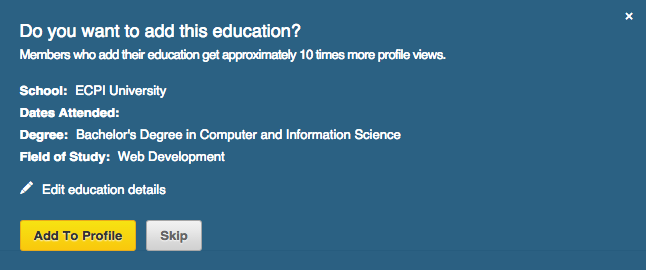
3. Once signed in, you will see an area appear over your profile prompting you to add the degree or diploma of your choice to your profile (See Screenshot below). You may also add addition info before selecting "Add To Profile."